
眠るシーラカンスと水底のプログラマー
Winodws Phone, Windows, EC-CUBEの情報を発信しますDynamics CRM Online Fall ’13にPHPで接続する(その3:データ作成編)
水曜日 , 23, 4月 2014 Dynamics CRM, Dynamics CRM 2013 Leave a comment本記事は「Dynamics CRM Online Fall ’13にPHPで接続する(その2:データ取得編)」の続きとなります。
今回は認証後のSOAPによるデータの作成について紹介します。
(記事一覧はタグ:Dynamics CRM 2013にPHPで接続するを参照ください。)
SOAPLoggerでXMLを確認する
前回同様にSOAPLoggerを利用してC#でサンプルを作成してみます。
今回は取引担当者(Contact)を追加してみます。
C#コードは以下。
      //Add the code you want to test here:
      // You must use the SoapLoggerOrganizationService 'slos' proxy rather than the IOrganizationService proxy you would normally use.
      Contact contact = new Contact() { FirstName = "sample", LastName = "sample2", EMailAddress1 = "sampleadress@gmail.com" };
      slos.Create(contact);
上記コードをFiddlerで覗いたBODY部分は以下。
<Create xmlns="http://schemas.microsoft.com/xrm/2011/Contracts/Services">
  <entity xmlns:b="http://schemas.microsoft.com/xrm/2011/Contracts" xmlns:i="http://www.w3.org/2001/XMLSchema-instance">
    <b:Attributes xmlns:c="http://schemas.datacontract.org/2004/07/System.Collections.Generic">

      <b:KeyValuePairOfstringanyType>
        <c:key>firstname</c:key>
        <c:value i:type="d:string" xmlns:d="http://www.w3.org/2001/XMLSchema">sample</c:value>
      </b:KeyValuePairOfstringanyType>

      <b:KeyValuePairOfstringanyType>
        <c:key>lastname</c:key>
        <c:value i:type="d:string" xmlns:d="http://www.w3.org/2001/XMLSchema">sample2</c:value>
      </b:KeyValuePairOfstringanyType>

      <b:KeyValuePairOfstringanyType>
        <c:key>emailaddress1</c:key>
        <c:value i:type="d:string" xmlns:d="http://www.w3.org/2001/XMLSchema">sampleadress@gmail.com</c:value>
      </b:KeyValuePairOfstringanyType>

    </b:Attributes>
    <b:EntityState i:nil="true"/>
    <b:FormattedValues xmlns:c="http://schemas.datacontract.org/2004/07/System.Collections.Generic"/>
    <b:Id>00000000-0000-0000-0000-000000000000</b:Id>
    <b:LogicalName>contact</b:LogicalName>
    <b:RelatedEntities xmlns:c="http://schemas.datacontract.org/2004/07/System.Collections.Generic"/>
  </entity>
</Create>
PHPで実行するサンプルコードは以下。
                $createContact = '
<Create xmlns="http://schemas.microsoft.com/xrm/2011/Contracts/Services">
  <entity xmlns:b="http://schemas.microsoft.com/xrm/2011/Contracts" xmlns:i="http://www.w3.org/2001/XMLSchema-instance">
    <b:Attributes xmlns:c="http://schemas.datacontract.org/2004/07/System.Collections.Generic">

      <b:KeyValuePairOfstringanyType>
        <c:key>firstname</c:key>
        <c:value i:type="d:string" xmlns:d="http://www.w3.org/2001/XMLSchema">test</c:value>
      </b:KeyValuePairOfstringanyType>

      <b:KeyValuePairOfstringanyType>
        <c:key>lastname</c:key>
        <c:value i:type="d:string" xmlns:d="http://www.w3.org/2001/XMLSchema">test</c:value>
      </b:KeyValuePairOfstringanyType>

      <b:KeyValuePairOfstringanyType>
        <c:key>emailaddress1</c:key>
        <c:value i:type="d:string" xmlns:d="http://www.w3.org/2001/XMLSchema">test@gmail.com</c:value>
      </b:KeyValuePairOfstringanyType>

    </b:Attributes>
    <b:EntityState i:nil="true"/>
    <b:FormattedValues xmlns:c="http://schemas.datacontract.org/2004/07/System.Collections.Generic"/>
    <b:Id>00000000-0000-0000-0000-000000000000</b:Id>
    <b:LogicalName>contact</b:LogicalName>
    <b:RelatedEntities xmlns:c="http://schemas.datacontract.org/2004/07/System.Collections.Generic"/>
  </entity>
</Create>
';

    $this->sendQuery($createContact, 'Create');
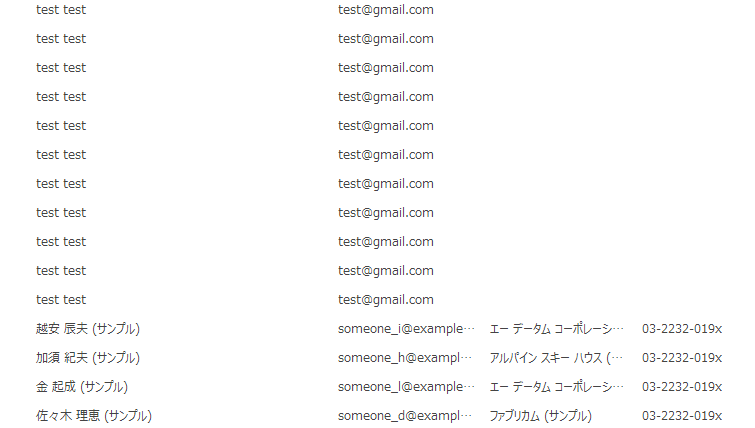
これでDynamics CRMにContactデータを追加することができました。
【参考書籍】

Microsoft Dynamics CRM 2011 Unleashed
posted with amazlet at 14.04.22
Marc J. Sinay, Damian Bhaiya, Rajya Vardhan Wolenik
Sams
売り上げランキング: 147,104
Sams
売り上げランキング: 147,104


Please give us your valuable comment