
眠るシーラカンスと水底のプログラマー
Winodws Phone, Windows, EC-CUBEの情報を発信しますDynamics CRM 2013 OnPremisesにPHPで接続する(その1:データ取得編)
日曜日 , 27, 4月 2014 Dynamics CRM, Dynamics CRM 2013 Leave a comment今回はオンプレミス版のDynamics CRM 2013にPHPから接続するサンプルです。
オンプレミスって自社サーバーとか非オンラインってニュアンスだと思うけどAzure上の仮想マシンにインストールしたDynamics CRMをオンプレミスと読んでいいのかは微妙な所・・・(オンプレミスって.NET界隈しか聞かないけどどうなんだろう)
これまでに紹介した、Online版のDynamics CRMに接続する方法はDynamics CRM 2013にPHPで接続するで一覧できます。
Fetchによるデータの取得
これまでSOAPによる通信方法を紹介してきましたが、オンライン版のDynamics CRM Online Fall ’13とオンプレミス版のDynamics CRM 2013では認証方法が異なります。
オンプレミス版はでActive Directory認証が必要になりちょっと面倒そうなので、いろいろ調べていたらFetch XMLで簡単に操作できることがわかりました。
Fetch XMLはデータの取得だけで、挿入・更新・削除などができないと思っていましたが、どうも違うようなので紹介します。
Fetch XMLで使えそうなサンプル
Fetchで使えそうなサンプルはこのページのものが役に立ちました。
そのままだと動かなかったのでXMLは部分を少し修正しました。
<?php

/* データを作成する場合
$soap_envelope = <<<END
<s:Envelope xmlns:s="http://schemas.xmlsoap.org/soap/envelope/">
<s:Body>
<Create xmlns="http://schemas.microsoft.com/xrm/2011/Contracts/Services">
  <entity xmlns:b="http://schemas.microsoft.com/xrm/2011/Contracts" xmlns:i="http://www.w3.org/2001/XMLSchema-instance">
    <b:Attributes xmlns:c="http://schemas.datacontract.org/2004/07/System.Collections.Generic">

      <b:KeyValuePairOfstringanyType>
        <c:key>firstname</c:key>
        <c:value i:type="d:string" xmlns:d="http://www.w3.org/2001/XMLSchema">testf</c:value>
      </b:KeyValuePairOfstringanyType>

      <b:KeyValuePairOfstringanyType>
        <c:key>lastname</c:key>
        <c:value i:type="d:string" xmlns:d="http://www.w3.org/2001/XMLSchema">testl</c:value>
      </b:KeyValuePairOfstringanyType>

      <b:KeyValuePairOfstringanyType>
        <c:key>emailaddress1</c:key>
        <c:value i:type="d:string" xmlns:d="http://www.w3.org/2001/XMLSchema">test@gmail.com</c:value>
      </b:KeyValuePairOfstringanyType>

    </b:Attributes>
    <b:EntityState i:nil="true"/>
    <b:FormattedValues xmlns:c="http://schemas.datacontract.org/2004/07/System.Collections.Generic"/>
    <b:Id>00000000-0000-0000-0000-000000000000</b:Id>
    <b:LogicalName>contact</b:LogicalName>
    <b:RelatedEntities xmlns:c="http://schemas.datacontract.org/2004/07/System.Collections.Generic"/>
  </entity>
</Create>
</s:Body>
</s:Envelope>
END;

$soap_action = 'http://schemas.microsoft.com/xrm/2011/Contracts/Services/IOrganizationService/Create';
*/

$soap_envelope = <<<END
<s:Envelope xmlns:s="http://schemas.xmlsoap.org/soap/envelope/">
<s:Body>
<RetrieveMultiple xmlns="http://schemas.microsoft.com/xrm/2011/Contracts/Services">
    <query i:type="b:QueryExpression" xmlns:b="http://schemas.microsoft.com/xrm/2011/Contracts" xmlns:i="http://www.w3.org/2001/XMLSchema-instance">
      <b:ColumnSet>
        <b:AllColumns>false</b:AllColumns>
        <b:Columns xmlns:c="http://schemas.microsoft.com/2003/10/Serialization/Arrays">
          <c:string>firstname</c:string>
          <c:string>lastname</c:string>
          <c:string>emailaddress1</c:string>
          <c:string>gendercode</c:string>
        </b:Columns>
      </b:ColumnSet>
      <b:Criteria>
        <b:Conditions>
          <b:ConditionExpression>
            <b:AttributeName>lastname</b:AttributeName>
            <b:Operator>Equal</b:Operator>
            <b:Values xmlns:c="http://schemas.microsoft.com/2003/10/Serialization/Arrays">
              <c:anyType i:type="d:string" xmlns:d="http://www.w3.org/2001/XMLSchema">test</c:anyType>
            </b:Values>
            <b:EntityName i:nil="true"/>
          </b:ConditionExpression>
        </b:Conditions>
        <b:FilterOperator>And</b:FilterOperator>
        <b:Filters/>
      </b:Criteria>
      <b:Distinct>false</b:Distinct>
      <b:EntityName>contact</b:EntityName>
      <b:LinkEntities/>
      <b:Orders/>
      <b:PageInfo>
        <b:Count>0</b:Count>
        <b:PageNumber>0</b:PageNumber>
        <b:PagingCookie i:nil="true"/>
        <b:ReturnTotalRecordCount>false</b:ReturnTotalRecordCount>
      </b:PageInfo>
      <b:NoLock>false</b:NoLock>
    </query>
  </RetrieveMultiple>
</s:Body>
</s:Envelope>
END;

$soap_action = 'http://schemas.microsoft.com/xrm/2011/Contracts/Services/IOrganizationService/RetrieveMultiple';

$req_location = 'http://{ドメイン}/{組織名}/XRMServices/2011/Organization.svc/web';

$headers = array(
  'Method: POST',
  'Connection: Keep-Alive',
  'User-Agent: PHP-SOAP-CURL',
  'Content-Type: text/xml; charset=utf-8',
  'SOAPAction: "'.$soap_action.'"'
);

$user = '{アクティブディレクトリのログインユーザー名(ドメイン\ユーザー名の形式)}';
$password = '{アクティブディレクトリにログインする際のパスワード}';

$ch = curl_init();
curl_setopt($ch, CURLOPT_URL, $req_location);
curl_setopt($ch, CURLOPT_RETURNTRANSFER, true);
curl_setopt($ch, CURLOPT_HTTPHEADER, $headers);
curl_setopt($ch, CURLOPT_POST, true );
curl_setopt($ch, CURLOPT_POSTFIELDS, $soap_envelope);
curl_setopt($ch, CURLOPT_HTTPAUTH, CURLAUTH_NTLM);
curl_setopt($ch, CURLOPT_USERPWD, $user.':'.$password);
$response = curl_exec($ch);

if(curl_exec($ch) === false)
{
  echo 'Curl error: ' . curl_error($ch);
}
else
{
  var_dump($response);
}
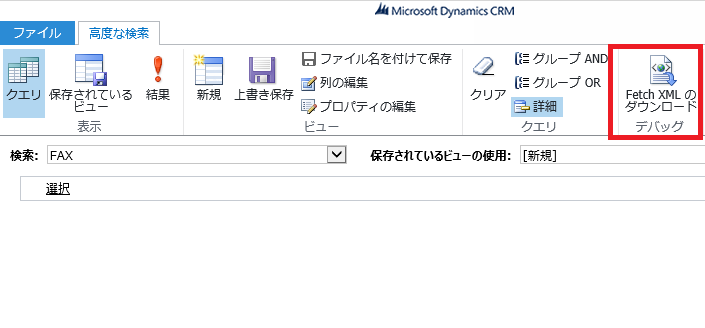
しかもFetch XMLの場合、Dynamics CRMのポータルからクエリを取得できたりと、こちらのほうが推奨な気配。
(「高度な検索」リンクから下記画像のページがポップアップします。)
オンライン版とオンプレミス版のコードを時間をとってちゃんとクラス化したいなぁ。


Please give us your valuable comment