
眠るシーラカンスと水底のプログラマー
Winodws Phone, Windows, EC-CUBEの情報を発信しますユニバーサルWindowsアプリ(Pre)入門034:BackgroundAudioサンプル
日曜日 , 19, 7月 2015 WinRT(UWP), UWP(Win 10) Preview Leave a comment(予め)本記事はプレビュー版の環境に基づいて書かれています。
Windows 1o Desctop Build 10240
Windows 1o Mobile Build 10166
Visual Studio 2015 RC
製品版では内容と異なる可能性もあります。
紹介したプロジェクトは以下から実行可能です。
UWPアプリのサンプル(GitHub)
バックグラウンド処理
バックグラウンドで音楽を鳴らし続けるBackgroundAudioサンプルを紹介します(ようやくBだ‼)。
気になったのはUWPアプリケーションではウィンドウを最小化した場合は状態はどうなるのか?
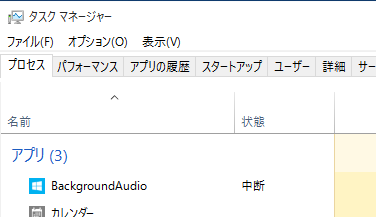
中断になるようです。
確かめてみると通常のMediaElementを用いた音楽ファイルの再生などは、ウィンドウ最小化で止みますが、BackgroundAudioでは継続されます。
マニフェストファイル
Windows 8.1のストアアプリの頃の作法ではバックグラウンド処理はマニフェストファイルにエントリーポイントを記述する必要がありました。
プロジェクトを確かめると、
<Extension Category="windows.backgroundTasks" EntryPoint="BackgroundAudioTask.MyBackgroundAudioTask">
  <BackgroundTasks>
    <Task Type="audio" />
  </BackgroundTasks>
</Extension>
指定してありますね。
プロジェクトもバックグラウンド処理用のBackgroundAudioTaskというプロジェクトがあります。
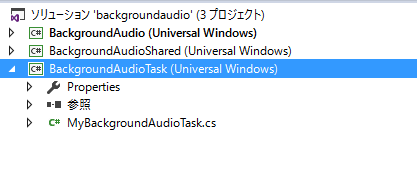
この辺の作法はWindows 8.1時代と同じ感じ。
バックグランド処理の登録
バックグランド処理の登録は・・・
var startResult = this.Dispatcher.RunAsync(CoreDispatcherPriority.Normal, () =>
{
    bool result = backgroundAudioTaskStarted.WaitOne(10000);
    //Send message to initiate playback
    if (result == true)
    {
        MessageService.SendMessageToBackground(new UpdatePlaylistMessage(playlistView.Songs.ToList()));
        MessageService.SendMessageToBackground(new StartPlaybackMessage());
    }
    else
    {
        throw new Exception("Background Audio Task didn't start in expected time");
    }
});
MessageService.SendMessageToBackgroundで局のリストや再生開始を伝えているようです。
エントリーポイントを含むバックグランド処理の実装が書かれたクラスは、
public sealed class MyBackgroundAudioTask : IBackgroundTask
{
IBackgroundTaskをインプリメントして、Runメソッドを実装しています。
       public void Run(IBackgroundTaskInstance taskInstance)
        {
            Debug.WriteLine("Background Audio Task " + taskInstance.Task.Name + " starting...");

            // Initialize SystemMediaTransportControls (SMTC) for integration with
            // the Universal Volume Control (UVC).
            //
            // The UI for the UVC must update even when the foreground process has been terminated
            // and therefore the SMTC is configured and updated from the background task.
            smtc = BackgroundMediaPlayer.Current.SystemMediaTransportControls;
            smtc.ButtonPressed += smtc_ButtonPressed;
            smtc.PropertyChanged += smtc_PropertyChanged;
            smtc.IsEnabled = true;
            smtc.IsPauseEnabled = true;
            smtc.IsPlayEnabled = true;
            smtc.IsNextEnabled = true;
            smtc.IsPreviousEnabled = true;

            // Read persisted state of foreground app
            var value = ApplicationSettingsHelper.ReadResetSettingsValue(ApplicationSettingsConstants.AppState);
            if (value == null)
                foregroundAppState = AppState.Unknown;
            else
                foregroundAppState = EnumHelper.Parse<AppState>(value.ToString());

            // Add handlers for MediaPlayer
            BackgroundMediaPlayer.Current.CurrentStateChanged += Current_CurrentStateChanged;

            // Initialize message channel
            BackgroundMediaPlayer.MessageReceivedFromForeground += BackgroundMediaPlayer_MessageReceivedFromForeground;

            // Send information to foreground that background task has been started if app is active
            if (foregroundAppState != AppState.Suspended)
                MessageService.SendMessageToForeground(new BackgroundAudioTaskStartedMessage());

            ApplicationSettingsHelper.SaveSettingsValue(ApplicationSettingsConstants.BackgroundTaskState, BackgroundTaskState.Running.ToString());

            deferral = taskInstance.GetDeferral(); // This must be retrieved prior to subscribing to events below which use it

            // Mark the background task as started to unblock SMTC Play operation (see related WaitOne on this signal)
            backgroundTaskStarted.Set();

            // Associate a cancellation and completed handlers with the background task.
            taskInstance.Task.Completed += TaskCompleted;
            taskInstance.Canceled += new BackgroundTaskCanceledEventHandler(OnCanceled); // event may raise immediately before continung thread excecution so must be at the end
        }
ちょっと長いですけどSystemMediaTransportControlsでバックグランドで音楽を鳴らすコントロールを行います。
BackgroundMediaPlayer.MessageReceivedFromForeground
で、フォアグランドからのメッセージを処理しているようです。
Windows 8.1時代にはバックグランドタスクで利用できるリソース制限などはロック画面に出すか出さないかなどで違っていましたが、その辺の制御は今回あるのかな?


Please give us your valuable comment