
眠るシーラカンスと水底のプログラマー
Winodws Phone, Windows, EC-CUBEの情報を発信しますユニバーサルWindowsアプリ(Pre)入門009:ファイル操作1
水曜日 , 24, 6月 2015 WinRT(UWP), UWP(Win 10) Preview Leave a comment毎度のお約束、本記事はプレビュー状態のOS、IDE、SDKを利用しております。製品版では異なる可能性があります。
本記事はWindows 10向けのユニバーサルWindowsアプリについて学んだことを残して行く記事です。
これまでの記事はカテゴリ「UWP(Win 10) Preview」を参照ください。
ファイル操作
今回はGitHubで公開されているユニバーサルWindowsアプリのFileAccessプロジェクトで紹介されているファイル操作について。
まぁ、アプリを動かしてみれば早いのですが、読み物としてどうぞ。
以下のメニューの一つ一つを簡単に読んでみます。
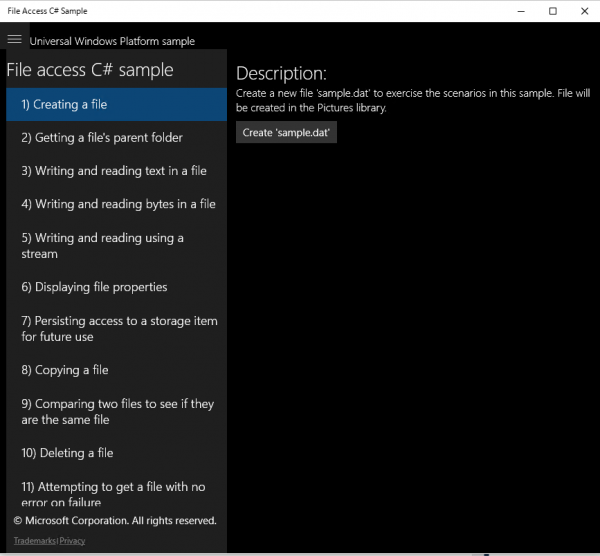
1.ファイルの作成
ファイルを作成します。
StorageFolder storageFolder = KnownFolders.PicturesLibrary;
rootPage.sampleFile = await storageFolder.CreateFileAsync(MainPage.filename, CreationCollisionOption.ReplaceExisting);
サンプルはピクチャフォルダにファイルを作成します。Windows PhoneでもちゃんとPicturesフォルダにファイルができていました。
2.ファイルの親ディレクトリを取得します
StorageFolder parentFolder = await file.GetParentAsync();
fileはStorageFileクラス。
3.テキストを書きこむ
await FileIO.WriteTextAsync(file, userContent);
string fileContent = await FileIO.ReadTextAsync(file);
どちらもFileNotFoundExceptionのトライキャッチ。
4.バイトデータを書きこむ
読み込み。
IBuffer buffer = await FileIO.ReadBufferAsync(file);
using (DataReader dataReader = DataReader.FromBuffer(buffer))
{
    string fileContent = dataReader.ReadString(buffer.Length);
書きこみ。
IBuffer buffer = GetBufferFromString(userContent);
await FileIO.WriteBufferAsync(file, buffer);
事前にバッファーを取得しておく。
private IBuffer GetBufferFromString(String str)
{
    using (InMemoryRandomAccessStream memoryStream = new InMemoryRandomAccessStream())
    {
        using (DataWriter dataWriter = new DataWriter(memoryStream))
        {
            dataWriter.WriteString(str);
            return dataWriter.DetachBuffer();
        }
    }
}
5.Streamを使う
書きこみ。StorageStreamTransactionって使ったことないなぁと思って調べたらWindows 8時代からあったんですね・・・。
using (StorageStreamTransaction transaction = await file.OpenTransactedWriteAsync())
{
    using (DataWriter dataWriter = new DataWriter(transaction.Stream))
    {
        dataWriter.WriteString(userContent);
        transaction.Stream.Size = await dataWriter.StoreAsync(); // reset stream size to override the file
        await transaction.CommitAsync();
        rootPage.NotifyUser(String.Format("The following text was written to '{0}' using a stream:{1}{2}", file.Name, Environment.NewLine, userContent), NotifyType.StatusMessage);
    }
}
読み込み。
using (IRandomAccessStream readStream = await file.OpenAsync(FileAccessMode.Read))
{
    using (DataReader dataReader = new DataReader(readStream))
    {
        UInt64 size = readStream.Size;
        if (size <= UInt32.MaxValue)
        {
            UInt32 numBytesLoaded = await dataReader.LoadAsync((UInt32)size);
            string fileContent = dataReader.ReadString(numBytesLoaded);
            rootPage.NotifyUser(String.Format("The following text was read from '{0}' using a stream:{1}{2}", file.Name, Environment.NewLine, fileContent), NotifyType.StatusMessage);
        }
        else
        {
            rootPage.NotifyUser(String.Format("File {0} is too big for LoadAsync to load in a single chunk. Files larger than 4GB need to be broken into multiple chunks to be loaded by LoadAsync.", file.Name), NotifyType.ErrorMessage);
        }
    }
}
6.ファイルのプロパティ情報を取得
StorageFileクラスを用いて色々なプロパティを取得する。
StringBuilder outputText = new StringBuilder();
outputText.AppendLine(String.Format("File name: {0}", file.Name));
outputText.AppendLine(String.Format("File type: {0}", file.FileType));

// Get basic properties
BasicProperties basicProperties = await file.GetBasicPropertiesAsync();
outputText.AppendLine(String.Format("File size: {0} bytes", basicProperties.Size));
outputText.AppendLine(String.Format("Date modified: {0}", basicProperties.DateModified));

// Get extra properties
List<string> propertiesName = new List<string>();
propertiesName.Add(dateAccessedProperty);
propertiesName.Add(fileOwnerProperty);
IDictionary<string, object> extraProperties = await file.Properties.RetrievePropertiesAsync(propertiesName);
var propValue = extraProperties[dateAccessedProperty];
if (propValue != null)
{
    outputText.AppendLine(String.Format("Date accessed: {0}", propValue));
}
propValue = extraProperties[fileOwnerProperty];
if (propValue != null)
{
    outputText.Append(String.Format("File owner: {0}", propValue));
}
7.最近使ったファイルへの登録
OS全体の最近使ったファイルではなく、アプリ固有のリスト。
StorageApplicationPermissions.MostRecentlyUsedList.Add(file, file.Name, visibility);
AccessListEntryView entries = StorageApplicationPermissions.MostRecentlyUsedList.Entries;

StorageApplicationPermissions.FutureAccessList.Add(file, file.Name);
AccessListEntryView entries = StorageApplicationPermissions.FutureAccessList.Entries;
8.ファイルのコピー
StorageFile fileCopy = await file.CopyAsync(KnownFolders.PicturesLibrary, "sample - Copy.dat", NameCollisionOption.ReplaceExisting);
9.ファイルの比較
ファイルピッカーでファイルを一つ取得して、そのファイルと対象のファイルを比較する。
FileOpenPicker picker = new FileOpenPicker();
picker.SuggestedStartLocation = PickerLocationId.PicturesLibrary;
picker.FileTypeFilter.Add("*");
StorageFile comparand = await picker.PickSingleFileAsync();
if (comparand != null)
{
    try
    {
        if (file.IsEqual(comparand))
10.ファイルの削除
await file.DeleteAsync();
11.ファイルがあれば取得なければnull
StorageFolder storageFolder = KnownFolders.PicturesLibrary;
StorageFile file = await storageFolder.TryGetItemAsync("sample.dat") as StorageFile;
要マニフェスト
画像フォルダを利用することをマニフェストファイル(Package.appxmanifest)に記述します。
   <Capabilities>
        <uap:Capability Name="picturesLibrary"/>
    </Capabilities>
こうやって書いてみると、Win 8、8.1時代のファイル操作ということがわかります。


Please give us your valuable comment