
眠るシーラカンスと水底のプログラマー
Winodws Phone, Windows, EC-CUBEの情報を発信しますユニバーサルWindowsアプリ(Pre)入門019:AutoSuggestBoxを利用する
土曜日 , 4, 7月 2015 WinRT(UWP), UWP(Win 10) Preview Leave a comment毎度のお約束、本記事はプレビュー状態のOS、IDE、SDKを利用しております。製品版では異なる可能性があります。
本記事はWindows 10向けのユニバーサルWindowsアプリについて学んだことを残して行く記事です。
これまでの記事はカテゴリ「UWP(Win 10) Preview」を参照ください。
自動サジェスト機能
今回のGitHubのUWPアプリケーションのサンプルを紹介します。今回紹介するのはASBMigrationSampleです。
ASBMigrationSampleは自動サジェスト機能が付いたコントロールです。なぜ、序盤のこの段でコントロールの紹介をするかというとASBMigrationSampleというプロジェクト名が何を指すか気になって調べたからです(もうおわかりでしょうがAutoSuggestBoxの略でした・・・)。
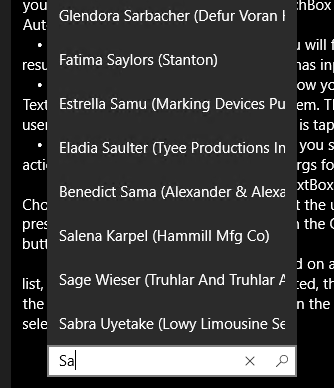
8.1のころもこういう表現をするサンプルがありましたが、コントロールとしてデフォルトで対応したんですねぇ。
XAML
AutoSuggestBoxのXAMLコードは以下。
<AutoSuggestBox x:Name="asb"
        PlaceholderText="Type a name (e.g. John)"
        TextChanged="asb_TextChanged"
        QueryIcon="Find"
        QuerySubmitted="asb_QuerySubmitted"
        SuggestionChosen="asb_SuggestionChosen"
        Margin="24,0,0,24" Width="250"
        HorizontalAlignment="Left"/>
「PlaceholderText」はあらかじめ表示する文字を指定します(文字通りプレースホルダ~ですね)。
ボックスの文字が変更されれば「TextChanged」に指定したイベントハンドラ―が呼び出されます。
サジェストした文字から選択されれば「SuggestionChosen」が、サジェストを選択したタイミングや、ボックスをタップしたタイミングで「QuerySubmitted」が呼び出されます。
イベントハンドラ―
各イベントハンドラ―の実装は以下。
private void asb_TextChanged(AutoSuggestBox sender, AutoSuggestBoxTextChangedEventArgs args)
{
    //We only want to get results when it was a user typing,
    //otherwise we assume the value got filled in by TextMemberPath
    //or the handler for SuggestionChosen
    if (args.Reason == AutoSuggestionBoxTextChangeReason.UserInput)
    {
        var matchingContacts = ContactSampleDataSource.GetMatchingContacts(sender.Text);

        sender.ItemsSource = matchingContacts.ToList();
    }
}

private void asb_QuerySubmitted(AutoSuggestBox sender, AutoSuggestBoxQuerySubmittedEventArgs args)
{
    if (args.ChosenSuggestion != null)
    {
        //User selected an item, take an action on it here
        SelectContact(args.ChosenSuggestion as Contact);
    }
    else
    {
        //Do a fuzzy search on the query text
        var matchingContacts = ContactSampleDataSource.GetMatchingContacts(args.QueryText);

        if (matchingContacts.Count() >= 1)
        {
            //Choose the first match
            SelectContact(matchingContacts.FirstOrDefault());
        }
        else
        {
            NoResults.Visibility = Visibility.Visible;
        }
    }
}

private void asb_SuggestionChosen(AutoSuggestBox sender, AutoSuggestBoxSuggestionChosenEventArgs args)
{
    var contact = args.SelectedItem as Contact;

    sender.Text = string.Format("{0} ({1})", contact.FullName, contact.Company);
}
サジェスト候補を取得する
サジェスト候補として渡しているリストや、検索はContact.csに記述されています。
検索はこんな感じでLINQになっています。
public static IEnumerable<Contact> GetMatchingContacts(string query)
{
    return ContactSampleDataSource.Contacts
        .Where(c => c.FirstName.IndexOf(query, StringComparison.CurrentCultureIgnoreCase) > -1 ||
                    c.LastName.IndexOf(query, StringComparison.CurrentCultureIgnoreCase) > -1 ||
                    c.Company.IndexOf(query, StringComparison.CurrentCultureIgnoreCase) > -1)
        .OrderByDescending(c => c.FirstName.StartsWith(query, StringComparison.CurrentCultureIgnoreCase))
        .ThenByDescending(c => c.LastName.StartsWith(query, StringComparison.CurrentCultureIgnoreCase))
        .ThenByDescending(c => c.Company.StartsWith(query, StringComparison.CurrentCultureIgnoreCase));
}


Please give us your valuable comment